
OBD II GPS tracker
Nero Pulse.
Live GPS and vehicle insights, without hardwiring. For your car, your household or your fleet. One tracker per vehicle.
Live GPS, trip history and vehicle insights. For one car or your fleet.
- Live GPS & trip history
- Speed & geofence alerts
- Reports & driving scores
- Supported diagnostics
Activate after delivery through Corsa Nero Security. Plan charges are separate from this hardware purchase.
- Ships within 3 business days
- 30-day returns
- Secure checkout
GPS tracking only. No kill switch. Installed security

Nero Pulse for business
Keep your working
vehicles in view.
See where your vehicles are, review their trips and understand driving activity from one account.
Inside the Nero app
Your vehicles.
One clear view.
Find your vehicle, follow a journey and review each drive. Your connected vehicles, together in the Nero app.
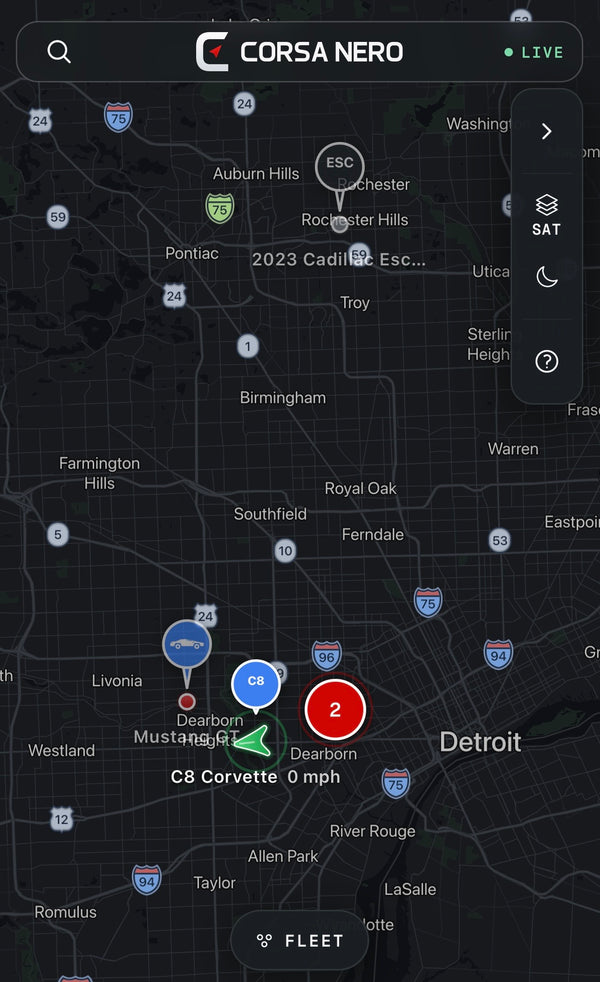
Your vehicles, together.
Follow every journey.
The video could not load. Explore the app screens below.
Location, journeys and vehicle insights.
Your connected cars in one account.
Trip and activity reports across vehicles.
01 / Understand the drive
See the drive.
Understand the details.
Review braking and acceleration events on the route, with the location and change in speed.
Choose how braking, acceleration and cornering are evaluated.


02 / Look after your vehicle
A clearer picture
of vehicle health.
Check battery condition, engine trouble codes and supported readings before your next service.
See the diagnostic code and its description.
Review battery voltage, fuel level and more.
- Health score
- 90/ 100
- Battery
- Good
- Trouble codes
- 1
Catalyst system efficiency below threshold (Bank 2)
Key readings
- 12V battery
- 12.6 V
- Fuel level
- 51%
- Coolant
- 194°F
Maintenance reminders
Plan the next service.
Set mileage or time intervals for oil changes, tire rotations and other routine maintenance.
03 / See the bigger picture
Your mileage.
Your activity.
One overview.
Compare distance, driving time and scores across your vehicles. Look closer at driving events and time spent idling.


Start with Pulse for your compatible vehicle.
Product information
Before you order.
Not sure about your vehicle? Send us its year, make and model before ordering.
Check my vehicleIs Nero Pulse only for fleets?
No. Pulse is for individual drivers, households and businesses. Start with a device for one compatible vehicle, or contact us to discuss a larger rollout.
What is included?
Your hardware package includes the Nero Pulse tracker, a quick start card with its device identifier and a support QR code.
The separate tracking plan includes live location, trip history, speed and geofence alerts, reports, driving scores and supported vehicle diagnostics.
Vehicle compatibility
Nero Pulse supports most vehicles from model year 1996 onward with a compatible OBD II port. Compatibility and available diagnostics vary by vehicle.
Nero Pulse is a tracker. It does not include a kill switch or remote immobilizer.
Request a vehicle compatibility check with your vehicle’s year, make, and model.
Tracking plan and activation
A separate subscription is required for tracking. The monthly charge is $14.99/month.
Your hardware purchase does not start a subscription. Activate after delivery through Corsa Nero Security, where plan payments and vehicle tracking are managed.
How do I get started?
- Create your account. Register through Corsa Nero Security and add your device using its IMEI.
- Activate your plan. Choose the required tracking plan. Billing is separate from your hardware order.
- Connect your device. Plug Pulse into the compatible OBD II port and follow the setup instructions.
Delivery and returns
Orders in stock ship within 3 business days. Available shipping options and charges are shown at checkout.
Contact product support for an order question.
Plug in. Get connected.
A simple start.
No hardwiring. Three steps to connect your compatible vehicle.
-
01 / Locate
Find your OBD II port.
Park safely and switch the ignition off. Look beneath the driver’s dashboard, usually near the steering column. Check your owner’s manual for its exact location.
-
02 / Connect
Align. Push firmly.
Match the connector to the port and push it straight in until securely seated. Do not force it. Keep the device clear of pedals and moving controls.
-
03 / Activate
Bring your vehicle into view.
Use the device identifier on your quick start card to set up your Corsa Nero Security account and tracking plan. Follow the activation instructions, then confirm your vehicle appears in the app.